Bookmark UniSync 3.3.237: What's New

Version 3.3.237 rebuilds the interface. Your bookmarks and sync are unchanged. If you update, you do not need to sign in again, and your bookmarks stay where they are. What changes is where things live and how they look: one Sync now button instead of two, a scrolling Settings list instead of a side menu, a filterable Time Machine, a guided dedupe wizard, and a three-step merge flow.
At a glance
| Area | 3.3.232 | 3.3.237 |
|---|---|---|
| Main screen | Manual mode, Upload + Sync from Cloud two buttons | Synced banner + one Sync now button |
| Settings | Left menu: Configuration / Time Machine / Tabs / Feedback | One scrolling list: Appearance, Sync settings, Content & backup, Account |
| Time Machine | Flat list of versions | Filters (All / Saved only / Local / Server), grouped by date, Current version card, per-version notes |
| Dedupe | 1 Scan → 2 Select → 3 Delete → 4 Done | Four-step wizard: Find → Choose what to keep → Clean → Done |
| Merge | 4 steps, Choose files first | 3 steps: Files → Confirm → Merged, drag-and-drop, local processing until the last step |
| Export | Downloads directly | One extra confirmation step, then downloads |
| More menu | One row: Dedupe · merge · rate · export | Popup grouped into Organize and Learn & feedback |
| Bookmarks & sync | 546 bookmarks | 546 bookmarks, unchanged |
| My Shares | “站长工具”, 118 bookmarks, 2 views | Same, unchanged |
Main screen: one button instead of two
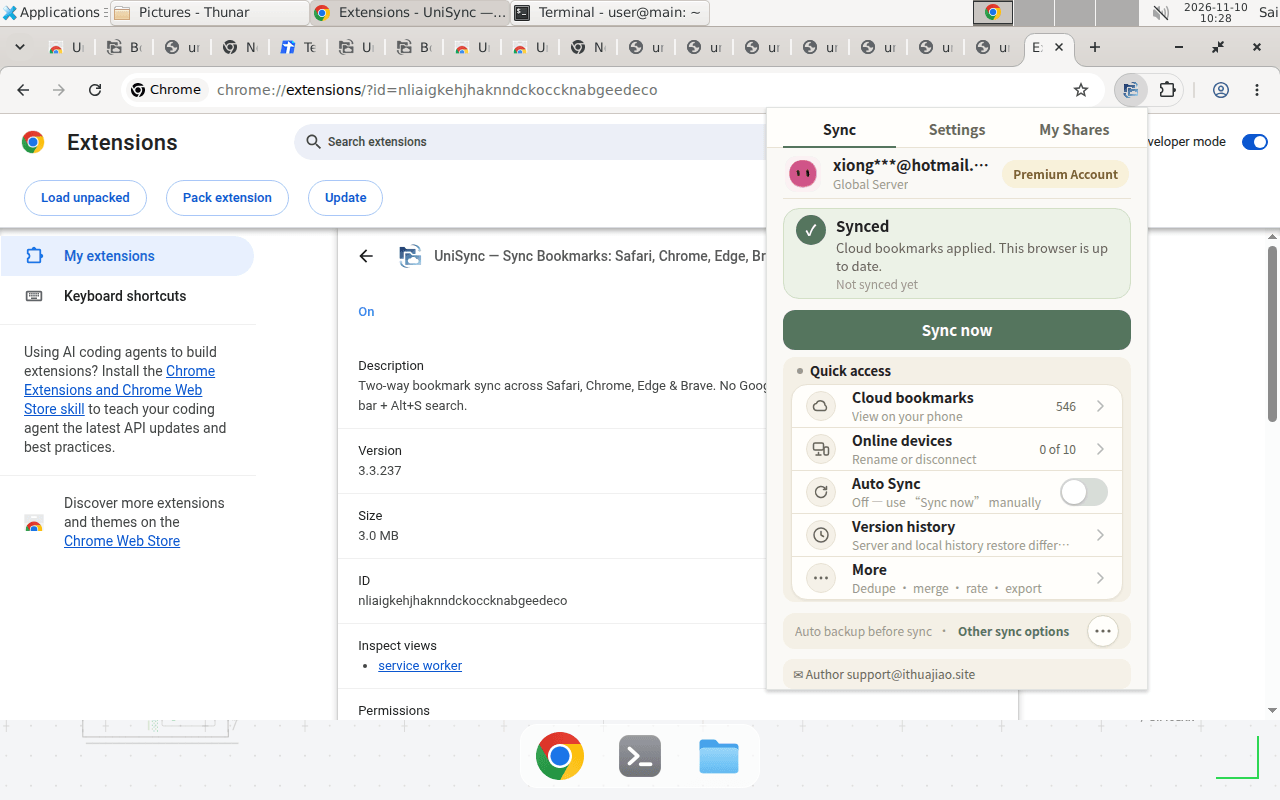
The main screen is now a green Synced banner and a single Sync now button, replacing the two buttons. Quick access is still there: Cloud bookmarks (546), Online devices (0 of 10), Auto Sync (Off), Version history, and More.
What this means for you: if you used to tap Sync from Cloud to pull bookmarks down, tap Sync now instead. Your login, your account (Premium), and your server (Global Server) are unchanged.
Settings: a scrolling list, not a side menu
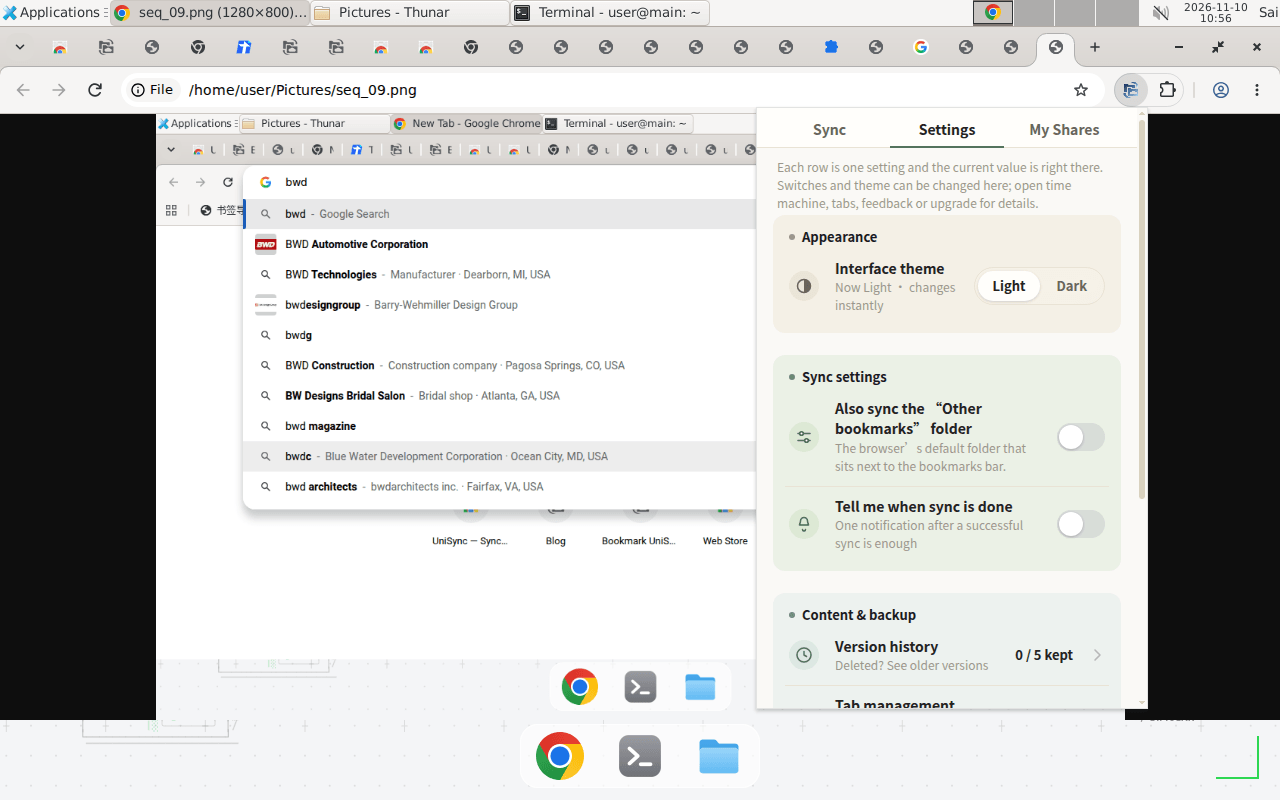
Settings is now a single scrolling list, grouped into Appearance (Interface theme Light/Dark), Sync settings (Also sync the "Other bookmarks" folder, Tell me when sync is done), Content & backup (Version history, Tab management), and Account (Feedback, Official blog, version and server, your email).
The Tabs page is now two number boxes (Maximum tabs, Time limit in minutes) with a Save Config button. The Feedback page is a text box with a Submit button.
What this means for you: nothing is removed. It is the same settings, laid out in one column. Scroll to find what you need.
Time Machine: filters, dates, and notes
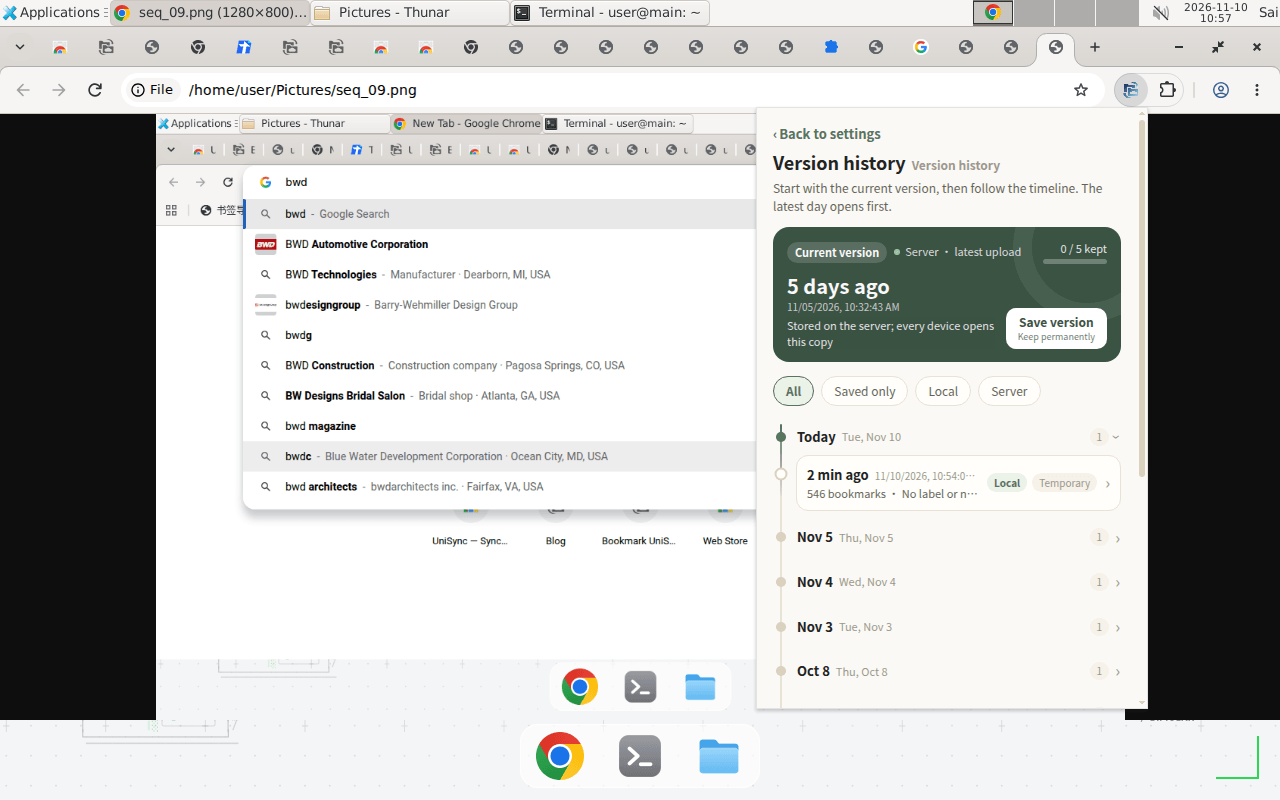
Time Machine can now filter by All / Saved only / Local / Server, versions are grouped by date, and there is a Current version card at the top with a Save version button ("Keep permanently"). Each version can be expanded to add a note, and there is a Restore this version button.
What this means for you: if you want to keep a version permanently, open the Current version card and tap Save version before you restore anything. The restore confirmation itself is also reworded ("Confirm recovery to the selected version?"), but the action is the same.
Dedupe: choose first, then scan
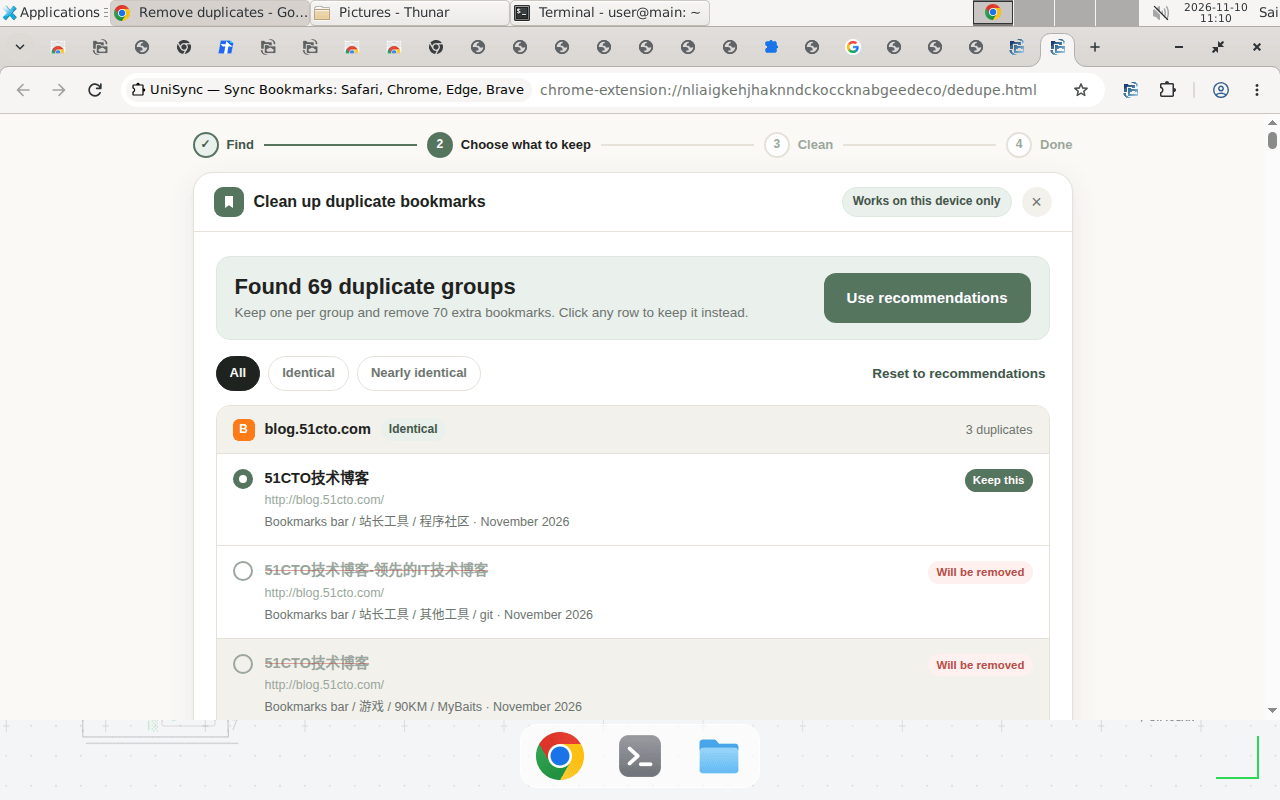
Dedupe is now a four-step wizard: Find → Choose what to keep → Clean → Done. Before scanning, you choose what to keep (earliest saved, most recent, or most complete title) and how thorough the check is (Thorough or Only exact matches). You can filter results by All / Identical / Nearly identical, and each item is marked Keep this or Will be removed.
The result is the same on the same bookmarks: 69 groups with 70 duplicate bookmarks.
Merge: three steps, local until the last step
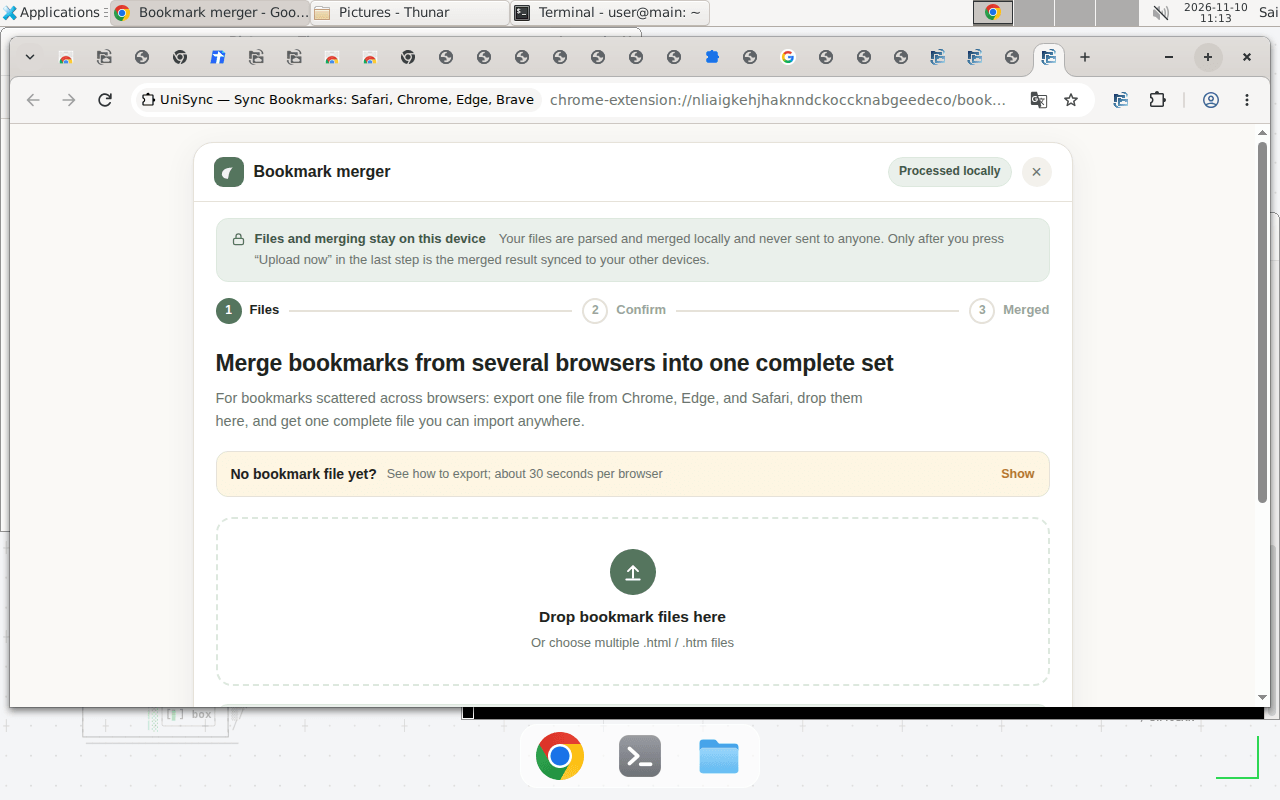
Merge is now three steps: 1 Files → 2 Confirm → 3 Merged, with a drag-and-drop area. Merging happens on your device, and only the last step (Upload now) sends the result to the cloud.
The merge page address has changed. It is now bookmark-merger/index.html. If you bookmarked the old address (bookmark-merger.html), update it.
Export: one extra confirmation
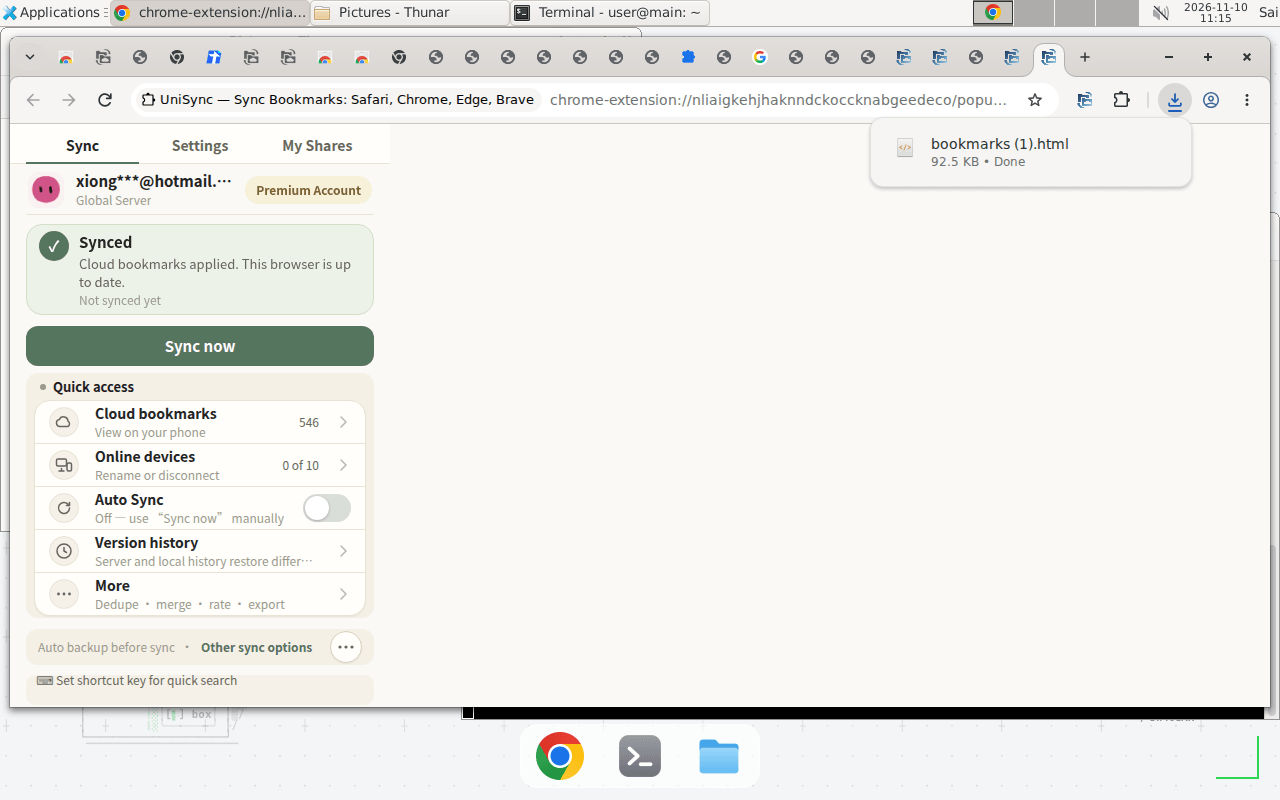
Exporting now asks "Export bookmark data to local?" (Cancel / Confirm) before it starts. After you confirm, it shows "Exporting bookmarks…" and then downloads. The file is the same size as before: 92.5 KB.
More menu: grouped, with dangerous actions at the bottom
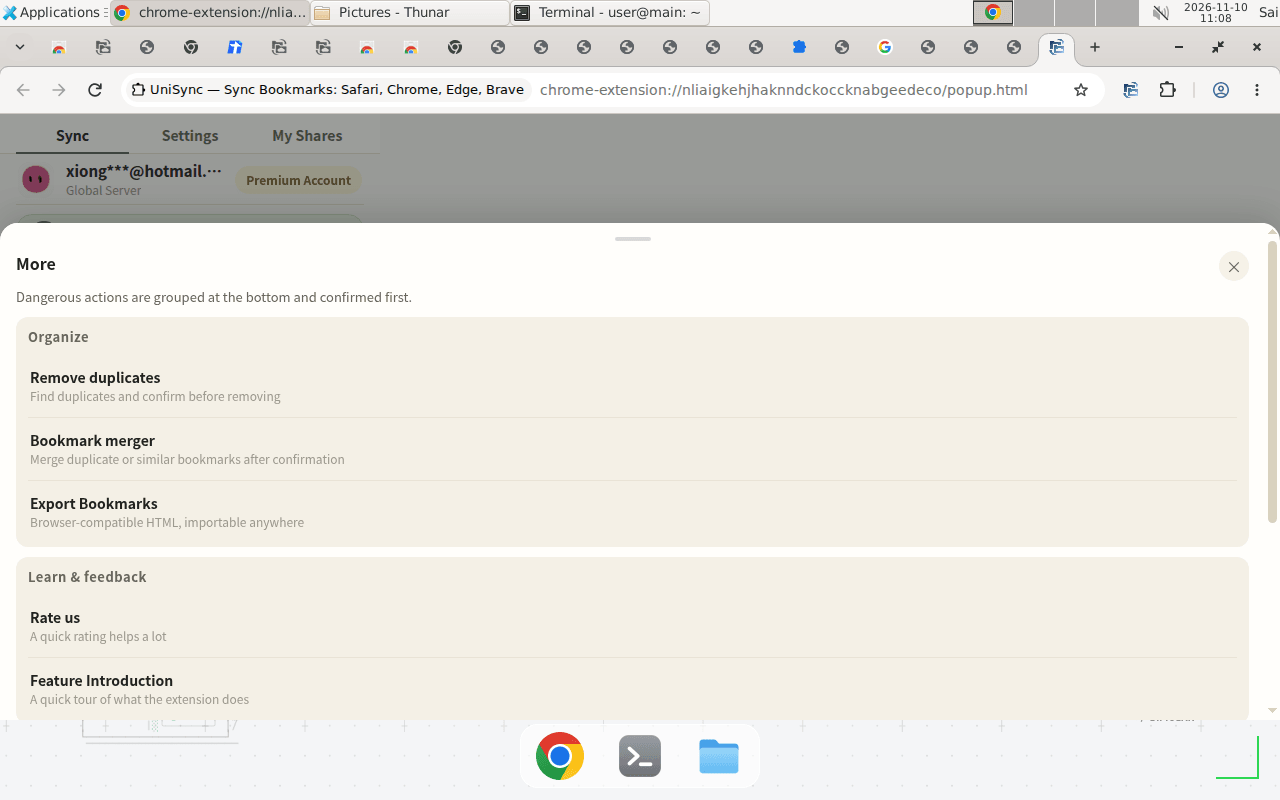
The More menu is now a popup with a note: "Dangerous actions are grouped at the bottom and confirmed first." Items are grouped into Organize and Learn & feedback.
What did not change
- Your bookmarks and sync. Still 546 bookmarks, same on local and cloud. The update does not touch your bookmarks.
- Your login. After updating from 3.3.232 to 3.3.237, you stay signed in. No re-login is needed.
- Cloud bookmarks bar. The same entries, in the same order.
- My Shares. Still the same share (“站长工具”, 118 bookmarks, 2 views).
- Dedupe and export numbers. Dedupe still finds 69 groups / 70 items; export is still 92.5 KB.
How to update
- Open the Chrome Web Store page for Bookmark UniSync and check that the version is 3.3.237 (Updated November 10, 2026).
- Update the extension. Your login and bookmarks carry over.
- Open the extension once and confirm the main screen shows Synced and your bookmark count is what you expect.
- If anything looks wrong, do not delete bookmarks or run a large sync. Save the current version first (Time Machine → Current version → Save version), then contact support.